FTP
The FTP integration allows you to upload your survey responses to a remote server.
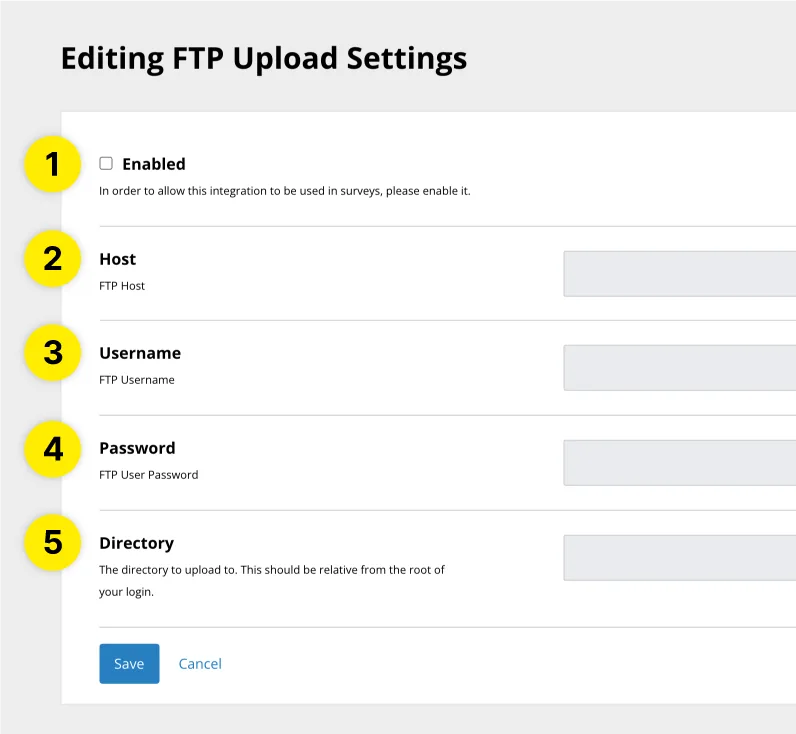
- Enabled : Tick this checkbox to enable the integration
- Host : Enter the host name for the server you would like to upload your survey responses to
- Username : Enter the username for the server you would like to upload your survey responses to
- Password : Enter the password for the server you would like to upload your survey responses to
- Directory : Enter the directory you would like to upload survey responses to. This is relative to the root of the server (i.e. "/" would indicate that you would like to upload survey responses to the root of the server.)
Enable FTP Integration on Survey
- Visit the Surveys page
- Next to the survey you would like to export respondent data to your FTP from, click “Edit”
- Scroll down to the "Integrations" section
- Enable FTP as an integration
- Click "Save"